Create
1. SQL query
Example, we have the example diagram bellow:
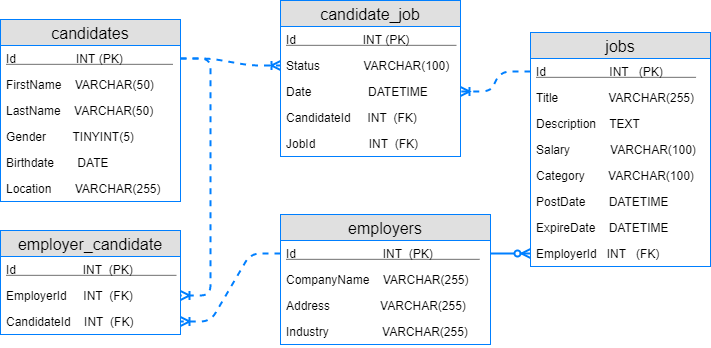
Then, we will create the tables. Example: We have the SQL query to create
candidates table:
CREATE TABLE candidates (
    Id          INT,
    FirstName   VARCHAR(50),
    LastName    VARCHAR(50),
    Gender      TINYINT(5),
    Birthdate   DATE,
    Location    VARCHAR(255)
);
and want to execute this query in CouchDB, Neo4j, Redis, SQLite, MySQL,
dbAPI will help you. See the next sections.
2. dbAPI syntax
dbAPI for CouchDB usage:
var dbAPI = require('./dbAPI-server').dbAPI;

dbAPI(input, function (output) {
   var status = output.others.status;

   if (status == CONST.STATUS_OK){
        return output.data.results;
    } else {
        console.log("Error/Warnings: " + output.others.message);
        return status;
    }
});
with the input:
input = {
    "metadata": {
        "dbinfo": {
            "DBMS": "couchdb",
            "cFile": "../dbAPI-server/config/dbinfo.couchdb.json"
        }
    },
    "data": {
        "format": "text",
        "szSQL": "CREATE TABLE candidates (id INT, firstname VARCHAR(50), gender TINYINT(5), Birthdate DATE, Location VARCHAR(255));"
    }
}
If you want to execute the SQL create query in other DBMS, just change the
"DBMS" name from couchdb to neo4j, redis, mysql
or sqlite. Then change the cFile to corresponding DBMS
configuration file. The package support different methods of connection e.g. using
direct configuration information "config", pre-connected instance
"dbInstance" or secure SSL certificate connection via
"connectionString".
Continue to create for 4 table left (same syntax with example).